

https://gateway.ngrok.ai, so you can set defaults like timeouts and token limits once instead of repeating them on every access key configuration.
Timeouts
If a single attempt exceeds
perRequestTimeout, the gateway moves on to the next fallback.
If total time exceeds totalTimeout, the gateway returns an error.
perRequestTimeout must be less than or equal to totalTimeout.
Streaming responses
Streams use the per-request timeout differently, so a long completion isn’t cut off:- The per-request timeout applies only until the provider sends the first byte. After that, the stream fails if the provider sends nothing for 30 seconds.
- The total timeout applies to the whole stream, including the time after the first byte.
Token limits
Leave token limits unset for no cap.
Set them to block oversized requests before they reach a provider.
Limits must be greater than zero.
maxOutputTokens also applies when your request doesn’t set an output limit: the gateway adds one.
When your request asks for more, the gateway lowers it to your limit, and to the model’s own maximum.
Request capture
Request capture stores the request and response headers and bodies, including prompts and completions, for your request and each attempt the gateway sends to a provider. You can inspect them in the request details panel on the Activity page. Capture is off by default. To turn it on:- Open Settings > Data Retention in app.ngrok.ai.
- Under Request Capture, set Full capture to Enabled.
- Select Save.
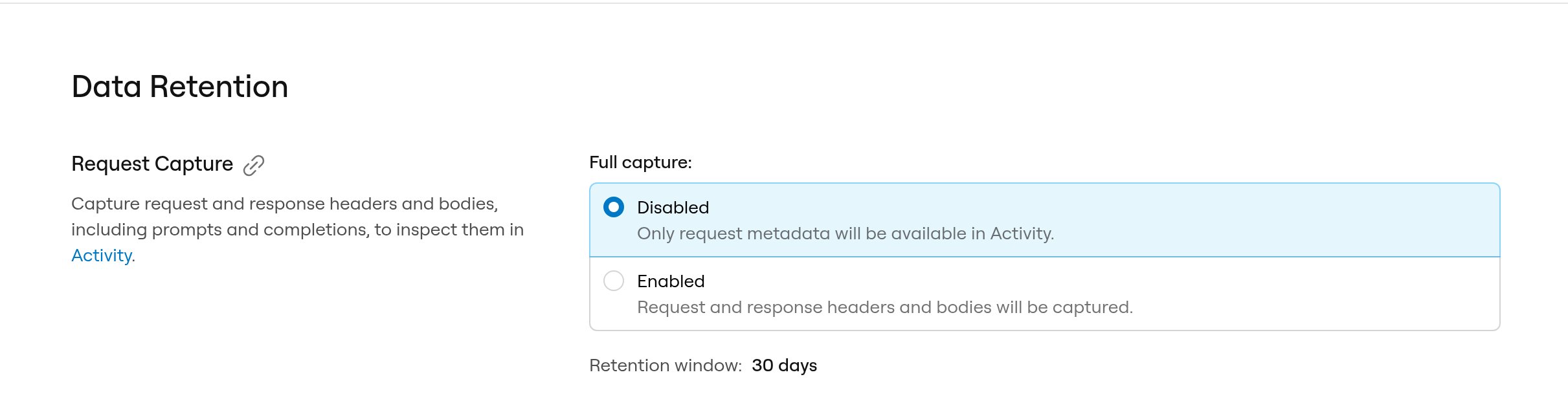
- Captures are kept for 30 days and then deleted.
- Each body stores up to 4 MB and each set of headers up to 16 KiB. Anything past the limit isn’t stored.
- Headers with these names are redacted, in any letter case:
Authorization,Proxy-Authorization,Cookie,Set-Cookie,x-api-key,x-goog-api-key,api-key,api_key,apikey,access-token,access_token,accesstoken,token,bearer,secret, andpassword. - When the gateway calls a provider with an ngrok-managed key, the provider’s response headers are redacted except
Content-Type. - Bodies are stored as sent, without redaction. The one exception is embedding vectors in embeddings responses, which are replaced with a placeholder that records the vector’s dimensions and a SHA-256 hash.
/gateway-config API doesn’t read or change it.
Via dashboard
- Open Settings in app.ngrok.ai
- On General, edit Total timeout, Per-request timeout, and optional token limits
- Save
https://gateway.ngrok.ai).
The other Settings pages are Data Retention for request capture, Admin API Keys for AI Gateway API keys, and Account, which links to dashboard.ngrok.com for your account details and team members.
Via the AI Gateway API
Get current settings:null:
30s, 2m).
See the Gateway configuration API reference.
Next steps
- How It Works: Request flow and failover
- Choose how to reach providers: Credits, provider keys, and self-run models
- Access Key Configurations: Per-key scope and routing